
Table of Contents
Multi-Material Printing Techniques and Best Practices
On the shop floor, the change is already easy to see: multi‑material printing is now expected, not a nice extra. Engineers want stronger parts. Educators need tools that show how designs behave in real use. Manufacturers are after fewer assemblies, faster turnaround, and less day‑to‑day friction. Those needs are simple, but the impact is big, especially where time and labour cost a lot.
Multi‑material printing lets a single part do more work. One build can combine rigid and flexible areas, or use soluble supports to handle complex shapes without extra fixtures. Wear surfaces and built‑in grips can print at the same time, skipping follow‑up steps. For Australian industries facing high labour costs and tight supply chains, fewer parts mean less handling, less assembly, and fewer chances for mistakes. That often leads to smoother runs and fewer failures.
The guide takes a clear look at how this works on real FDM systems. It explains the main methods, common material pairings, and setup choices that affect accuracy and speed, without getting stuck in theory. It also points out where issues usually begin and how to avoid them early. The focus stays on production uses like tooling and fixtures. And for teams considering high‑speed, high‑precision FDM systems from providers like Raven 3D Tech, the aim is better choices and fewer surprises later on.
What Multi-Material Printing Really Means in FDM
Multi-material printing in FDM matters most when one part needs more than one filament. Color changes are the easy part, but the real value comes from mixing traits like stiffness, heat resistance, or chemical strength. In industrial settings, performance comes first. Appearance still matters, but only after the part works well and holds up on the production floor.
The fast growth of FDM is easy to see in real use. Companies want parts they can use right away, not just models for display. Market data backs this up, showing regular growth in both machines and materials, which lines up with what many factories already see day to day.
| Metric | Value | Year |
|---|---|---|
| Global FDM 3D printer market size | USD 3.07 billion | 2026 |
| FDM market CAGR | 21.8% | 2026, 2035 |
| Industrial 3D printing market size | USD 20.8 billion | 2026 |
| 3D printing materials market size | USD 3.8 billion | 2026 |
On the shop floor, multi-material printing often means combining parts. Printing one finished piece instead of five separate ones cuts down assembly work, reduces tolerance issues, and saves time. MIT News researcher Kim Tackowiak points to flexibility as a clear strength of additive manufacturing, and this is a good example.
3D printing processes generally give us more flexibility because we don’t have to come up with forms or molds for things that would be made through more traditional means like injection molding.
For industrial engineers, that flexibility means faster design changes, more freedom in how parts are built, and fewer do-overs when schedules are tight.
Core Multi-Material 3D Printing Techniques
Multi-material FDM printing comes in a few approaches, each with clear trade-offs. Some work best with specific material pairs, while others grow more easily. As needs and materials change, the best choice often shifts as production volume rises.
Dual and Multi-Extruder Systems
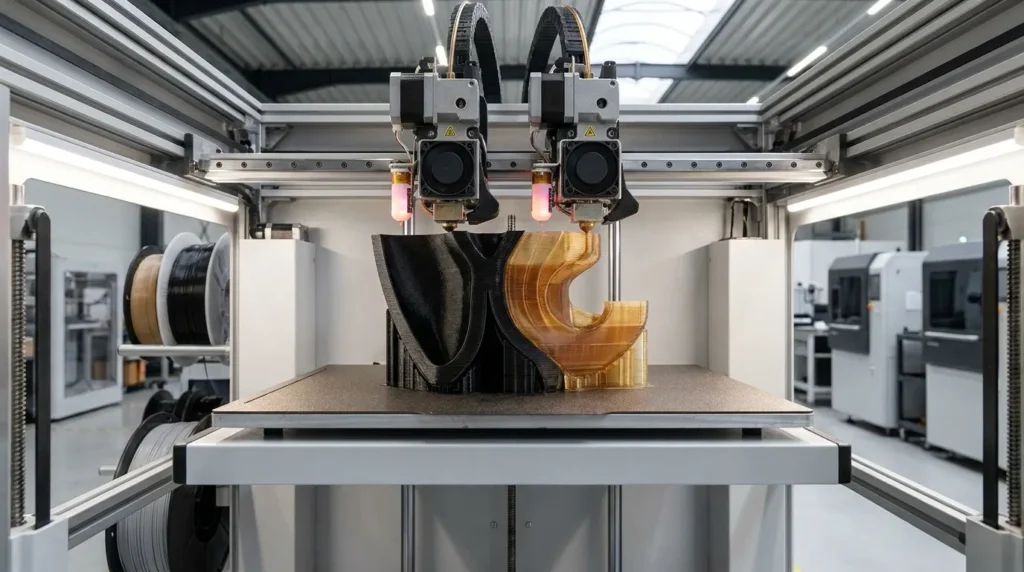
Mirror and duplicate modes stand out because they let printers make identical parts faster and boost overall output. Dual extrusion uses two separate extruders, each feeding a different filament. This setup is common in industrial prototyping. One nozzle builds the main part, while the second prints supports or another material, making cleanup easier. IDEX systems go a step further by letting each extruder move on its own along the same axis, keeping materials separate and well aligned.
Tool-Changing Printheads
Cross-contamination drops because each tool has its own nozzle and filament, which cuts purge waste during material changes and means less cleanup. During a job, tool-changing systems physically swap printheads through a mechanical handoff. This setup works well for precise work that needs repeatability, so it’s common in production settings and labs as well (you’ll see both).
Soluble Support Printing
Soluble supports are one of the most useful perks of multi‑material printing, you usually notice them right away. With materials like PVA or BVOH, the supports dissolve in water. This allows internal channels, undercuts, and complex cavities, then they vanish after a simple wash. They’re often used for ducts and enclosures, with jigs added when post‑processing access is limited, especially in tight, hard‑to‑reach spots.
During a print, these systems are visible while they run, which makes material changes easier to follow as they happen.
Material Compatibility and Performance Benchmarks
Multi‑material prints often fail at the join, not the design. Compatibility problems usually show up with heat behavior and layer bonding, so engineers need to think about both when picking materials, not after the first test print. Early material choices often reveal issues later, especially once parts face real load or heat.
Industrial FDM systems run everything from everyday PLA to high‑performance polymers, but the printer still sets clear limits. Performance benchmarks help set realistic expectations for strength, speed, and surface finish. They work best as hands‑on reference points during planning, not as shiny claims to chase.
| Parameter | Typical Value | Notes |
|---|---|---|
| Dimensional accuracy | ±0.5% or ±0.5 mm | Depends on calibration |
| Layer height | 100, 300 microns | Lower layers increase time |
| Minimum feature size | ~2.0 mm | Varies by nozzle |
| Supported materials | PLA, ABS, PETG, TPU, PEI | System dependent |
A common pairing is rigid PLA or ABS with flexible TPU. It’s popular because the rigid areas keep their shape while TPU handles bends or seals. The downside appears during tuning. TPU prints slower and needs careful retraction settings. Ignoring this often leads to stringing or weak layer bonds that can spoil an otherwise solid print.
Another issue comes from abrasive filaments. Carbon‑fiber filled materials wear down nozzles quickly, so hardened nozzles become necessary. Running abrasive and standard filaments through the same nozzle shortens tool life and slowly hurts dimensional accuracy.
What Works for High-Speed, High-Precision Printing
High speed and tight tolerances often push against each other, and multi-material printing makes that push more obvious. This isn’t new ground. The workflows are familiar, and the basics still work, as long as you stay consistent.
Before locking in a full build, small adhesion samples usually tell you more than a part that only looks finished. These tests reveal weak bonding, warping, or separation early, long before hours of machine time are wasted. Finding problems at this stage can save days of rework and a lot of frustration.
Thermal control needs the same level of care. Enclosed chambers help keep temperatures even across the build area, especially on longer prints. When heat drifts, layers, especially between different materials, can pull apart. It often starts quietly, then ends in a failed job.
Purge and transition settings need balance. Too much purge wastes time and material, while too little can cause color bleed or weak joins. Current slicers and firmware offer fine control, and it pays to adjust them carefully.
Part orientation matters too. FDM strength follows the filament path, which matters even more when soft and rigid materials share a print. Line up expected loads with that strength, and parts usually last longer.
As S. Scott Crump, inventor of FDM, has long said, the process was built for functional thermoplastic parts. Multi-material systems build on that idea, producing performance-focused parts in a single print.
Common Mistakes and How to Avoid Them
Most multi-material failures come from planning decisions, not the printer itself. Shrink rates are a common issue. When materials cool at different speeds, stress builds up, which often leads to warping or cracks right at the joint where the materials meet. Choosing materials with similar thermal behavior lowers that risk and saves a lot of late-stage frustration.
Overloading the printer brings its own set of problems. Adding more materials raises calibration demands, and even small nozzle offset errors can cause layers to slowly drift out of alignment. This shows up most on longer prints. Regular calibration isn’t optional here. It’s basic upkeep, even if skipping it feels easier.
Filament handling also matters. Hygroscopic materials like TPU and PVA absorb moisture fast. Wet filament creates bubbles, weak layers, and a rough surface finish that’s hard to miss. Proper storage and drying should be routine.
Multi-material printing also isn’t just about looks. Color swaps are simple, but functional combinations need clear planning early, especially at material boundaries.
Where Multi-Material Printing Is Headed
Multi‑material printing is now standard on industrial FDM systems. The newness has worn off, and the focus has shifted to speed and reliability. Tool‑changing systems are getting more popular because they cut purge waste and give more consistent results, which saves time operators notice.
Materials are pushing this change. Carbon‑fibre and glass‑fibre composites are more common, and flexible materials are now used in day‑to‑day production. Sustainability affects design decisions, with less purge waste and more recyclable filaments.
For Australian manufacturers, the benefits are practical. Local production and low‑volume runs linked to rapid tooling bring the biggest wins. Multi‑material printing supports Industry 4.0 training and builds on‑shore skills, lowering the need to rely on offshore suppliers.
Putting Multi-Material Printing Into Practice
The easiest wins come from starting small. One clear use case, like a jig with a soft grip, keeps things focused without adding extra complexity. Moving a little slower at the start helps as well. Testing parts in real conditions, not just on a screen, brings problems to the surface early. Along the way, writing down settings matters more than it sounds, especially the small tweaks that feel obvious at the time but never are later. Building up step by step, at a comfortable pace, saves time that would otherwise go into fixing simple mistakes.
Day-to-day reliability depends a lot on calibration and temperature control. They aren’t exciting, but they pay off fast. Dedicated nozzles, clean material paths (even between short runs), and consistent filament storage all make a clear difference. Treating materials as part of the regular workflow keeps results predictable.
Design intent is where multi-material printing really pays off. Used with purpose, it reduces assemblies, shortens lead times, and improves part performance with fewer compromises. For advanced FDM users, it’s no longer just a nice extra, it’s a proven way to handle prototyping, tooling, and production-ready parts, with more flexibility along the way.
