
Table of Contents
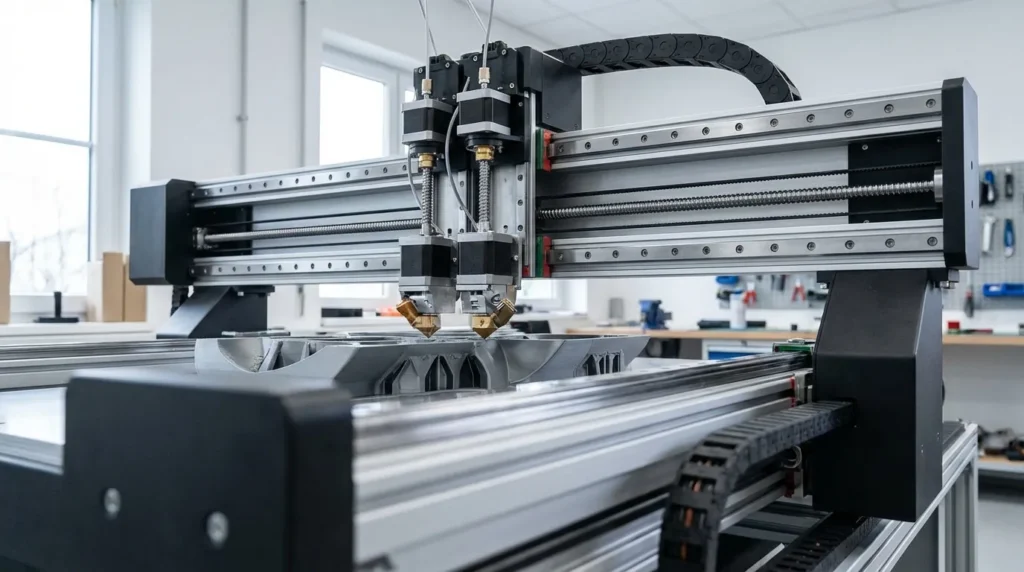
Maximizing Precision: Advanced Calibration Techniques for 3D Printers
Precision problems in 3D printing are frustrating. Parts can look perfect on screen, yet holes end up slightly off and surfaces ripple (you’ve probably noticed that strange waviness). Assemblies then refuse to fit where they should, like shafts missing their targets or panels not sitting flat. It’s annoying. Many teams blame the printer, which makes sense at first. But most of the time, the real problem is calibration, not the hardware. Good 3D printer calibration is often the difference between basic prints and true precision printing, where dimensions stay within tight tolerances. That difference matters, especially in real-world use.
In industrial and professional settings, small errors quickly turn into high costs. Engineers need the same tolerances every day, often over long production runs, without surprises. Educators and advanced hobbyists also rely on machines that behave predictably, even when pushed for speed and surface quality. And in Australia, where local manufacturing and rapid prototyping are growing fast, FDM printers are working harder than ever, usually under tight deadlines.
So what actually helps? This guide looks at advanced calibration techniques for high-speed, high-precision FDM systems (beyond basic leveling). It covers motion tuning, extrusion control, thermal stability, and firmware-level optimisation. The methods are practical, proven, and fit industrial workflows. Whether you’re running a RatRig V-Core or a more complex IDEX or custom Klipper-driven machine, the goal is simple: print faster, print more accurately, and have fewer parts fail on the bench.
Why Precision Calibration Matters in Industrial FDM Printing
What matters most in precision printing often shows up after the part leaves the printer. Appearance helps, but strength, fit, and how the part works in real use matter more on the factory floor. In tooling, even a small error can stop an assembly line and lead to costly downtime. Prototyping has similar risks: when accuracy is off, test results can’t be trusted, and choices end up going the wrong way. This is why calibration sits at the center of industrial 3D printing, there usually aren’t shortcuts, even if they seem tempting.
When set up the right way, modern FDM systems can reach tight tolerances. Industrial-grade machines often hit ±0.05 mm or better, which is very accurate. Mid-range systems with linear rails can get close too, but only when setup is done carefully and not rushed. Entry-level printers struggle more often; the hardware can usually handle it, but calibration is what gets skipped.
| Printer Class | Typical Tolerance |
|---|---|
| Entry-level FDM | ±0.3 to 0.5 mm |
| Tuned mid-range FDM | ±0.1 to 0.2 mm |
| Linear rail FDM | ±0.05 to 0.15 mm |
| Industrial FDM | ±0.05 mm or better |
Successful three-dimensional printing using fused deposition modeling (FDM) technology is highly dependent on process parameter calibration.
For industrial users, calibration isn’t a one-time task. It shifts with print speed, materials, and changing production needs. Skip advanced calibration, and the machine’s potential stays limited, often more than people expect.
Motion System Calibration for High-Speed Accuracy
As print speeds go up, motion errors tend to show up quickly. Ringing and ghosting often come from vibration, not extrusion, which still surprises a lot of people. That’s why motion calibration usually becomes a big focus once speed gets pushed, especially hard. From my experience, this is often where most setups start to hit their real limits.
What’s made a real difference is input shaping and resonance compensation. Tools like Klipper have changed what FDM printers can realistically handle. Instead of sticking to fixed motion values, the firmware measures how the frame reacts to acceleration and adjusts movement as it runs, which usually cuts down on trial and error. That change alone often shifts how people think about speed tuning.
The numbers are hard to ignore. Studies show Klipper with input shaping can reach up to a 50 percent speed increase without losing dimensional accuracy. In production-focused environments, that kind of gain often changes what’s practical day to day, and the time savings add up fast.
| Calibration Change | Measured Impact |
|---|---|
| Input shaping | Up to 50% speed increase |
| Resonance compensation | Reduced ringing and ghosting |
| Frame stiffness tuning | Improved repeatability |
The process usually means mounting an accelerometer and running test sweeps to generate the needed values. On machines like RatRig V-Core printers, this helps take advantage of rigid frames and linear rails, especially at higher speeds where stiffness matters most.
One easy-to-miss mistake happens earlier. Many users tune motion before checking belt tension or pulley alignment. Mechanical basics usually come first, no shortcuts. Firmware can only work within hardware limits, and you notice that pretty quickly.
Extrusion Calibration Beyond Steps per Millimetre
High‑speed printing is usually where extrusion shortcuts show up first. As speeds go up, a steady material flow has to hold together under pressure, especially during fast moves. That’s where a basic steps‑per‑millimetre setup often stops being enough. Many guides end there and move on, which can work at slower speeds (you’ve probably seen this yourself). In industrial settings, though, that method tends to fall apart pretty quickly. There really aren’t any shortcuts here.
Pressure advance, sometimes called linear advance, often makes the biggest difference. It deals with the small delay between motor movement and when material actually comes out of the nozzle. That delay causes a lot of issues. When it’s set wrong, corners can swell and dimensions slowly drift. When it’s tuned well, extrusion stays more consistent through sharp speed changes, and prints look cleaner overall.
Closed‑loop and servo‑driven extruders push this even further. Industrial testing reports up to a 67 percent increase in extrusion force, plus more than a 30 percent drop in production cycle time when calibration is done correctly. Those are solid gains.
| Extrusion Method | Key Benefit |
|---|---|
| Standard stepper | Basic control |
| Pressure advance | Sharper corners |
| Closed-loop extrusion | Consistent flow at high speed |
Dimensional accuracy in FDM is not governed by steps per millimeter alone, but by extrusion consistency, thermal control, and motion dynamics.
For IDEX systems, calibration needs to be done for each toolhead. Flow and temperature must match between extruders to keep multi‑material prints accurate. This is easy to overlook, but it shows up fast when one nozzle produces cleaner corners than the other.
Thermal Calibration and Material Behaviour
Temperature control often gets overlooked, and the results show up more than people expect. As filament moves through different heat zones during a print, it expands and contracts. Those shifts are easy to ignore, but when thermal calibration is off, the results usually show up as warping, layer separation, or small dimensional changes as parts cool.
A good starting point is accurate thermistor readings. Even a small offset can change how a material behaves once it melts, and that small change can make a noticeable difference. Print speed matters too. Higher speeds usually need a bit more heat to keep material flow steady and consistent.
The bed and chamber also matter, and there really aren’t shortcuts here. During continuous printing, heat soak builds over time. Dimensional drift often doesn’t appear until hours into a job, which is common in industrial runs.
More advanced setups use thermal modelling to manage this. It’s more complex, but it works. Dr. Angelo Ganitano notes that newer calibration methods balance speed and accuracy while also accounting for surface quality.
A practical option is to check calibration using real parts instead of simple cubes. Brackets or full assemblies show problems sooner because they reflect real shapes and loads.
System-Level Calibration for Production Environments
As FDM moves into real production work, calibration usually needs to grow with it. Dialing in one printer is fairly simple and often done by feel. Managing a whole fleet is another story. That’s where systems, clear documentation, and a more industrial mindset come into play. It’s a change in approach, with less guessing and more upfront setup so machines behave the same way, which doesn’t happen on its own.
At the fleet level, calibration often depends on standard profiles, regular checks, and controlled updates that are approved ahead of time. Firmware backups and slicer version control matter, and material tracking often helps keep output consistent. When changes are handled this way, results tend to stay predictable, which is usually the goal in production environments.
Market data helps explain why this matters. The industrial 3D printing market is expected to pass USD 20 billion by 2026, with end-use production parts growing at over 23 percent each year. Those figures are hard to ignore, and precision and repeatability often push that growth.
| Calibration Area | Production Impact |
|---|---|
| Motion profiles | Repeatable cycle times |
| Material settings | Consistent part quality |
| Firmware control | Reduced downtime |
For Australian manufacturers, this often means less dependence on offshore supply and shorter development cycles, with faster feedback and everyday control that’s easy to see.
Putting Precision Calibration Into Practice
The real payoff of advanced calibration often shows up as better control, not perfect results. For this setup, starting with solid mechanics, the belts, motion, and alignment, usually makes the firmware steps that follow easier to handle. Testing changes with real printed parts, and keeping clear notes along the way, saves time and confusion more often than not, even if it’s tempting to skip. Research supports using this order in most cases.
A consumer-grade FDM 3D printer can be significantly upgraded through systematic calibration, achieving up to a 50% reduction in printing time while maintaining dimensional accuracy.
For professionals running high‑performance FDM systems, the benefits show up fast. Prints often finish sooner, tolerances stay tight on functional parts, and failed jobs drop enough to notice during long production runs. If getting more out of a printer is the goal, calibration is worth revisiting with an industrial mindset, building a repeatable process instead of relying on one‑off tweaks.
Now It Is Your Turn to Refine Accuracy
Most high-precision prints succeed before the first layer even goes down, though that part is easy to miss. From the very start, calibration sets the tone. Motion and extrusion work as one system, and when temperatures are watched carefully, a tuned setup usually runs smoothly and starts to feel routine, in a good way. I still believe early setup is where accuracy either holds together or quietly falls apart.
For engineers, this often means prototypes and tooling you can actually trust. Educators and advanced hobbyists tend to get repeatable results instead of guessing, and speed can often increase without trade-offs, even during long runs.
What happens if you slow down and focus on one area first? You’ll notice that measuring, adjusting, and validating turns into a rhythm. Over time, the printer becomes predictable, like finishing a long print with no mid-run tweaks at all.
