
Table of Contents
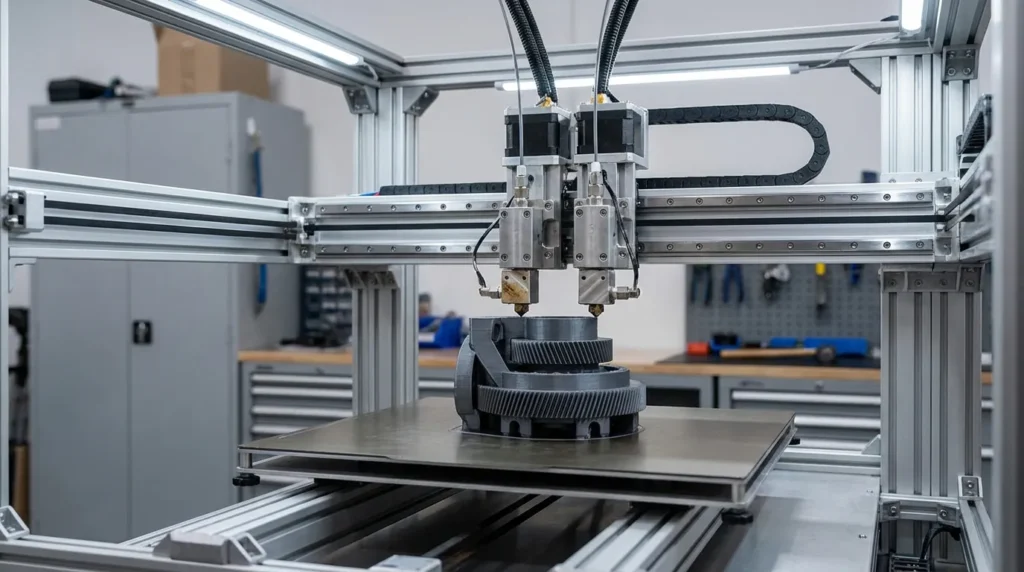
Dual Extrusion 3D Printer Calibration for Precision & Quality
Dual extrusion 3D printer setups let you print stronger parts with cleaner supports. They also let you mix two materials in one job, like stiff PLA with soluble supports. The problem shows up when calibration is off. Even small nozzle offsets can turn into failed prints or weak layer bonding. That wastes filament faster than most teams expect. For industrial users and advanced shops, those losses stack up fast. If you’ve watched a long print fail around hour six, you know how frustrating that can be.
Across Australia, engineers rely on dual extrusion FDM systems for tooling, fixtures, and short production runs that need to be right, not just close enough. On the shop floor, speed helps, but precision usually matters more when parts must fit properly and hold up in real use. That’s why calibration becomes a real business advantage instead of a one-time setup you forget about.
This guide walks through proven calibration methods for dual extrusion systems, with a focus on accuracy, consistency, and print quality that holds up under heat and load. It looks at how nozzle alignment really behaves, why flow tuning needs to be set for each extruder, and how newer IDEX and Klipper-based setups fit into everyday workflows. It’s hands-on and meant to be used, not just read. For a broader overview of pros and cons, see our Dual Extrusion 3D Printer: Benefits, Challenges & Tips.
Why Dual Extrusion 3D Printer Calibration Demands More Precision
Dual extrusion 3D printing sounds efficient, but it’s often more delicate than it seems. With two nozzles running at the same time, you’re dealing with twice the hardware and usually twice the chances for small issues to creep in. Each nozzle has its own heat zone, flow rate, mechanical offset, and firmware settings, and all of those can slowly drift. When even one is slightly off, problems like seams, color bleed, layer shifts, or weak bonding can appear halfway through a long print, which is usually the worst time. If you’ve run into this before, you already know how frustrating it can be.
Industrial FDM systems can keep tight tolerances, but that only happens after careful, repeatable calibration, and it takes real work. Studies show well-tuned machines often stay within ±0.05 mm to ±0.15 mm, while poorly calibrated setups drift much farther, especially during long or faster prints.
| Calibration State | Typical Tolerance | Impact on Production |
|---|---|---|
| Uncalibrated dual extrusion | ±0.3 mm or worse | High scrap and rework |
| Basic calibration only | ±0.15 mm | Acceptable for prototypes |
| Full industrial calibration | ±0.05, 0.1 mm | Production-grade parts |
The table shows the production impact clearly. Even a small improvement in tolerance can cut rework by up to 30 percent, lowering fixes, material waste, labor, and energy use at the same time.
Scott Kildall, who has studied multi-extruder alignment, explains why better alignment methods matter. It’s a genuinely useful way to look at the problem.
Over dozens of user studies this new process was shown to be significantly easier for users to understand and produced calibration results closer to the ground truth of the nozzle separation distance.
Step-by-Step Nozzle Offset and Mechanical Alignment
One of the first jobs in dual extrusion calibration is nozzle offset alignment. Simply put, this means matching the exact X and Y position of both nozzles, along with their Z height and even tiny rotational differences at the tip. These details may sound small, but they usually matter a lot. A mismatch of just 0.1 mm often shows up fast as rough surfaces, weak layer bonding, or corners that look a bit wrong. Very small numbers can be easy to see in real prints.
Before changing any software settings, it’s best to start with mechanical checks, even if it’s tempting to jump ahead. Loose hardware is often the real reason alignment feels impossible. Both hotends should be firmly mounted with no movement when pressed. Belt tension on every axis should feel even, pulleys need to be locked in place, and linear rails should move smoothly by hand without sticking. Software changes rarely fix physical problems, so spending time here usually saves a lot of frustration later.
Next comes X and Y offset calibration. A common method is printing an alignment pattern and adjusting offsets until the lines overlap cleanly instead of showing doubled edges or shadows. Some machines use cameras or probes instead. These tools tend to work better on larger or industrial systems, where consistent results matter more than print speed.
Z offset is often skipped, but it’s just as important. Both nozzles must touch the bed at the same height during printing. If one sits lower, it can scrape the bed or drag through finished areas. Always do this with the bed and nozzles heated, since metal expands as it warms up.
For IDEX users, alignment allows less room for error. Independent carriages give more printing options, but they also demand a cleaner setup. More detail is covered here: IDEX system installation and calibration for V-Core 3D printers.
Flow Rate, E-Steps, Temperature, and Material-Specific Tuning
Once the nozzles are lined up, calibration moves to extrusion control. This is where small details start to matter fast. Each extruder acts like its own machine, quirks and all, even if the hardware looks the same. Using the same settings for every tool sounds efficient, but it often leads to small problems that add up sooner than you expect.
E-steps come first, since the firmware needs to know how much filament is really being pushed. After that, flow rate tuning works best when it’s done per material. PLA and PETG behave differently, and filled filaments usually push those differences even further. One-size-fits-all settings rarely last.
Temperature matters just as much. There’s no guarantee both nozzles run the same, especially when heater placement and airflow differ. PID tuning each nozzle helps keep temperatures steady instead of drifting mid-print, which often shows up as uneven surfaces.
Edward Yi from Raise3D notes that these settings affect each other more than many users expect.
Industrial FDM machines can achieve a higher precision, with tolerances of ±0.15% or better when flow rate, extrusion temperature, and mechanical calibration are tightly controlled.
Pressure advance, also called linear advance, is another setting worth tuning per extruder, especially on faster machines. It’s easy to skip, but cleaner corners and fewer blobs during tool changes usually make the payoff clear after one print.
In multi-material setups, this level of tuning often makes the difference between clean layer changes and messy ones. You’ll usually see results within a test print or two. A few practical examples are covered here: dual extrusion 3D printer techniques for multi-material printing.
Bed Leveling, Thermal Control, Long Print Stability, and Calibration
Manufacturing case studies often show something pretty clear: when thermal control stays steady, overnight prints usually look the same as daytime ones. That kind of consistency matters most for tooling and jigs, where even small changes show up fast. Long prints are especially good at revealing issues that short test prints often hide.
With dual extrusion, bed leveling is harder than many people expect. Both nozzles need to keep the same distance across the whole bed, not just the front-left corner or a single test square, which is where most people begin. That’s tough to get right by feel alone. Automatic mesh leveling usually works better than manual adjustments, especially when Z offsets are set correctly at the start, not halfway through a six-hour print (we’ve all been there).
Thermal stability is another detail that’s easy to miss. During long runs, frames expand a bit and chamber temperatures can drift, slowly pushing things out of alignment. Industrial setups often use enclosures and controlled airflow so this drift stays in check and doesn’t show up overnight.
A common mistake is leveling the bed cold and then printing hot. That often leads to first-layer problems on one nozzle or the other, which gets frustrating fast. When possible, leveling at print temperature usually pays off, like when an overnight jig pops off the plate and fits perfectly the next morning.
For more on keeping machines stable during production, see our Essential Guide to 3D Printer Calibration: Techniques for Precision and Performance.
Advanced Trends: Automation, Vision Systems, IDEX, and Klipper Workflows
The biggest shift teams notice is calibration moving toward automation, mostly because it catches small mistakes before they grow. Vision systems and contact probes now manage nozzle height and bed alignment. This removes guesswork and keeps results steady, not just faster. It matters most on dual extrusion setups, where tiny nozzle offsets can quietly add up and only show up halfway through a failed print (we’ve all been there).
IDEX printers are gaining ground in industrial shops handling short‑run production. Mirrored or duplicated prints raise output, but accuracy depends on calibration routines being tight and repeatable, especially during overnight runs or long shifts.
Klipper changes daily calibration in a similar way. With finer motion control, tweaks like pressure advance or input shaping are easy to see in the surface finish. Many Australian teams support this with shared, simple checklists, so a part printed on Monday still looks right on Friday.
Putting Calibration into Daily Practice
The most useful calibration plan usually fits how printing actually happens on the shop bench, not how it looks on paper. That’s why it helps to start by writing down baseline settings for the extruders and materials you use most. Simple notes on offsets, flow rates, and temperatures, and why something changed, are usually enough. Nothing fancy.
After bigger changes, like swapping a nozzle or opening a new filament, quick check prints such as calibration cubes or dual‑material tests can catch problems early. Ask yourself: what’s easier than rolling back a tweak you already wrote down when a print goes sideways? Small, careful moves often beat big jumps.
For teams running printer fleets, standardising calibration can save time and cut down machine‑to‑machine differences. I also think it makes onboarding smoother, especially in a new operator’s first week. If you want a broader foundation, the ultimate guide to FDM 3D printer calibration techniques is a solid companion, especially before setting up a shared PLA profile on a new printer.
Where Precision Really Comes From
What often surprises people is that good dual extrusion shows up through small, repeatable wins, not perfect results. It’s not magic either (sadly). When nozzle tips line up, flow gets checked with real extrusion tests, and temperature and cooling are tuned for each material, results usually become predictable. That’s when cleaner edges and fewer blobs start to show, which is always nice on everyday prints.
For industrial engineers and advanced users, calibration can turn a dual extrusion 3D printer from a risky setup into a real advantage, in my view. Cleaner parts, less wasted filament, tighter tolerances, and more confidence during overnight runs tend to follow.
The basics still come first: nozzle offsets, bed leveling, and material profiles. One helpful approach is building quick pre‑print checks. Why rush changes? Add tools like flow tests or temp towers when needed, and try them on a real overnight job.
