
Table of Contents
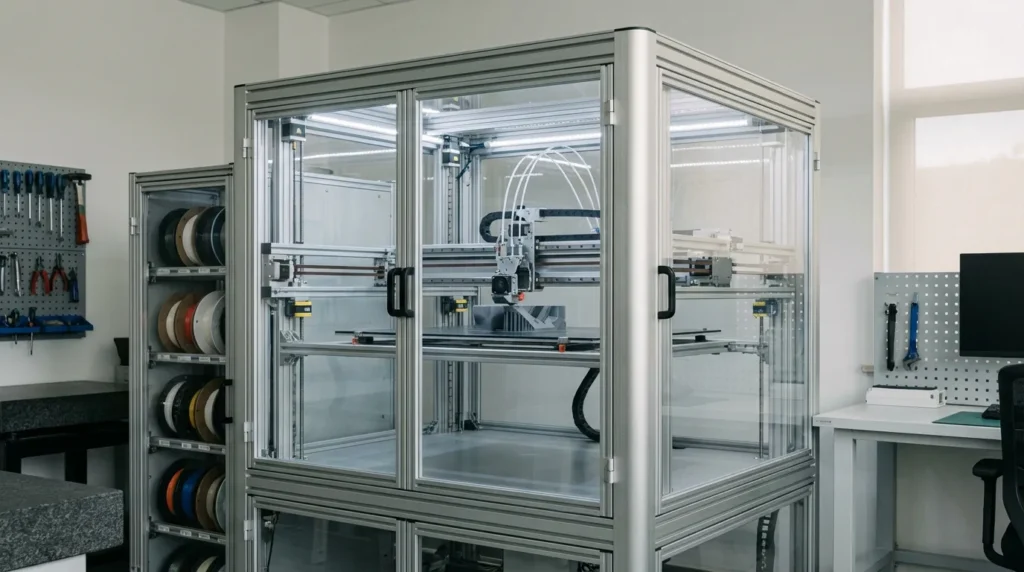
Automating 3D Printers for Consistent FDM Results
If you’ve ever opened the workshop in the morning and found a failed print, you know the feeling, that drop in your stomach that can ruin the start of the day. Missed layers, warped parts, or filament running out halfway through the night are frustrating on their own. When they stack up, it’s an especially rough way to begin. For industrial teams and serious users, these problems don’t just affect mood; they waste real time and real money. That’s likely why automating 3D printers isn’t just a nice extra anymore. In many cases, it’s becoming necessary, especially when parts need to be ready for the next shift.
What often gets missed is how automation cuts down the human guesswork in FDM printer setups, issues people usually catch only after a print has already failed. Better repeatability and higher uptime tend to follow, which helps reduce the constant worry around printing. It might sound minor, but in real use it means teams can trust a printer to give the same result on Monday morning as it did on Friday night, without constant checking. In Australia, where labour costs are high and lead times matter more than many expect, that level of consistency can easily decide whether a production workflow works or falls apart.
This guide explains how automation actually works in real FDM systems, not theory, but what’s being used today. It looks at hardware upgrades, firmware and software, workflow automation, and common mistakes, without fluff. It also shows how industrial users are applying these ideas right now. Whether you’re running a print farm or supporting a TAFE lab that also handles shop‑floor tooling, which is more common than people think, the aim is a smarter, more reliable FDM setup you can usually trust.
Why Automating 3D Printers Matters for Modern FDM Printing
FDM printing has grown quickly over the past few years. What started as a hobbyist tool has, in my view, often turned into everyday equipment for real work, not just weekend projects. Today it commonly supports jigs, fixtures, prototypes, and short production runs. That shift is easy to see. At the same time, expectations changed. People now expect machines to run unattended, often overnight, while still holding tight tolerances without someone standing nearby or checking every layer. When those parts land on the shop floor, that level of reliability usually matters a lot.
Market data helps explain this change. The global FDM 3D printing market is projected to reach over USD 3 billion by 2026, which is a big number. Industrial 3D printing overall is growing even faster. What stands out, though, is that most printers shipped today are still desktop FDM systems. This often brings industrial-style automation into smaller machines that are easier to set up and can sit right on the shop floor, sometimes next to other equipment.
| Metric | Value | Year |
|---|---|---|
| Global FDM market size | USD 3.22 billion | 2026 |
| Industrial 3D printing market | USD 5.22 billion | 2026 |
| Desktop FDM share under $1,000 | ~85% of shipments | 2025 |
Day-to-day efficiency is another area where automation shows real value. With automated FDM workflows, uptime can often reach 80 to 90 percent, which makes a real difference. CNC machines, by comparison, often sit idle between jobs, setups, or when operators aren’t available, and that downtime adds up. This helps explain why FDM has gained trust for tooling and production aids, especially when schedules are tight and no one can watch every machine.
Automation and ease-of-use improvements from entry-level FDM printers are pushing expectations upward across industrial systems. Features like automated bed leveling, tuning, and process control are becoming baseline requirements heading into 2026.
Building a Reliable Automated FDM Printer Setup
A reliable FDM printer setup usually starts with the hardware, at least in the author’s view. Software helps, but it often can’t fix a machine that isn’t mechanically sound. Many users only realize this after running into the same failures again and again. Automation works best when the base system is rigid, square, and properly aligned. Speed also matters more than people expect once several jobs are lined up. That’s why many industrial users choose coreXY or V-core style platforms. These designs handle fast movement while staying stable, which makes them a sensible place to begin.
Hardware built for automation often includes automatic bed levelling and filament runout sensors. These aren’t flashy features, but they quietly prevent common problems. Auto bed levelling removes a major cause of first-layer issues, cutting down on manual tweaks and wasted restarts. Filament sensors are especially helpful on long prints because they catch problems early instead of letting a job fail hours later. Enclosed build chambers are also common. With steadier temperatures, materials behave more consistently and prints are easier to predict.
Closed-loop stepper control has also become more popular. By spotting skipped steps and correcting motion as it happens, these systems can really help at higher speeds, where small mistakes can ruin a part.
Once the hardware is sorted, firmware becomes the printer’s brain, and this is where things usually get more interesting. Many advanced users choose Klipper-based setups because they offer speed, flexibility, and simpler remote control when running multiple machines. Features like input shaping and pressure advance help improve automation without hurting surface quality.
For Australian manufacturers, working with local integrators like https://raven3dtech.com.au/ can make this stage easier. Pre-built systems and tested setups save time and reduce risk, which matters when printers are running nonstop in production, day after day.
Automating Calibration and Process Control
Calibration is where many teams usually lose consistency. Manual tuning depends on who’s running the machine and how much time they have that day, and that can change more than people expect. Automation cuts down that variation and, in my view, makes results easier to repeat in real-world use. With less guesswork involved, predictability often shows up quickly in everyday prints.
Modern FDM systems can automate Z offset, mesh bed leveling, flow calibration, and even resonance tuning. These checks often run at startup or on a set schedule, so the printer checks itself before each job. That’s more reliable than memory or handwritten notes, which often get lost. This works especially well in print farms and shared spaces like universities, where many users use the same machines and habits are rarely consistent.
Monitoring is another part of automated process control. Camera systems and sensor data can spot failures early, sometimes before a print is completely lost. Some setups pause or stop jobs when issues appear, which usually reduces wasted material during long runs.
I think that’s the Holy Grail for AM because with in-process control you’re able to almost immediately react on deficiencies within your process.
A common mistake is automating everything at once. Teams add sensors and scripts before understanding how and why prints fail. It’s often better to start with first-layer reliability and extrusion control, then build from there. Confidence tends to grow over time. Automation should simplify work and make problems easier to trace, not harder to debug.
Scaling with Workflow and Print Farm Automation
Scaling usually starts to make sense once a single printer is running smoothly, and that’s often when workflow automation starts to feel useful day to day. With print farm software, jobs can be queued and material use tracked across several machines, so it’s easier to see what’s running and where. For industrial users, this kind of visibility feeds into traceability and regular quality checks. It helps without adding extra steps, which matters when schedules are already tight.
Automated filament handling is another area where the gains add up quickly. Central storage and auto‑loading systems can keep dozens of printers supplied during long runs, including overnight. With fewer manual swaps, materials tend to stay drier and more consistent, and print results are usually easier to predict.
| Automation Feature | Impact on Production | Typical Use Case |
|---|---|---|
| Print queue management | Higher uptime | Print farms |
| Automated filament reload | Fewer failed prints | Overnight jobs |
| Job tracking and logs | Better QA | Industrial tooling |
Robotic part removal and bed swapping are appearing more often. They’re still rare in small shops, but interest is growing in high‑volume setups. The goal is lights‑out printing, which works best overnight or on weekends, especially when staff are limited.
Advanced Automation Trends to Watch in Automating 3D Printers
The biggest change is how automation now goes beyond the printer itself, which was probably overdue. Post‑processing is finally getting real attention, and it needed it. Automated support removal and surface finishing can now be connected, while inspection runs through separate systems. In industrial settings, these steps often take longer than the print, so automating them boosts throughput and makes busy production weeks feel less stressful.
At the same time, AI‑driven slicing and parameter optimisation are already being tested, and this often ends up being more helpful than expected. By adjusting settings based on geometry and material history, these tools reduce setup time as teams get used to them. There’s less guesswork and more everyday confidence.
Post-processing automation will become one of the major things to watch out for. This is because the real step change will be in the ability to automate post-production.
For Australian businesses, these trends often fit local conditions well. High wages and long supply chains make automation a practical choice, but reliability still matters so the payoff feels real, not just theoretical.
Putting Automation into Practice
Automation tends to pay off when the goals are clear from the start. Fewer failures, better repeatability, or faster output all push choices in different ways, and you usually can’t maximize everything at the same time. Speed sounds exciting, but for many teams, reliability comes first. It’s easy to chase every new feature, I see that happen a lot, but sticking with what truly helps usually works better in the long run.
So where do problems show up most often in the current setup? A careful audit usually points to familiar trouble spots. First layers are a common issue, and extrusion problems often follow close behind. Material handling can also cause trouble on certain machines. Many teams find that automating only the biggest bottlenecks saves more time than trying to fix everything at once. A practical approach is to stay with proven hardware and firmware, then change one variable at a time so results are easy to understand.
Long-term success often comes down to support and documentation. Sensors and wiring matter, but training staff and students often matters just as much, even though it’s easy to overlook. Experienced suppliers, like https://raven3dtech.com.au/, can help build systems that grow without headaches. To me, that’s how printers earn trust: consistent results that let teams focus on design instead of reprints, like getting through a full day without watching first layers nonstop. Ultimately, automating 3D printers is about giving teams confidence to scale their production without constant supervision.
