
Table of Contents
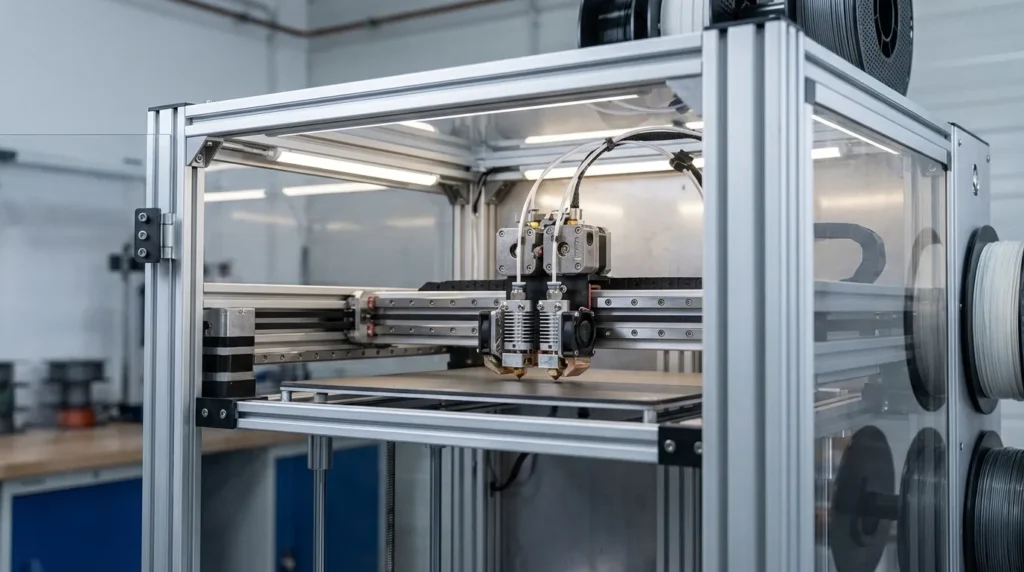
Understanding 3D Printer Upgrades: Essential Modifications for Enhanced Performance
High‑performance FDM printing usually isn’t about buying the biggest or newest machine anymore. For many engineers and manufacturers, the real gains often come from smart 3D printer upgrades that improve speed, accuracy, and reliability instead of flashy extras. In Australia, that hits close to home. Downtime costs money, parts need to come out right the first time, and printers run long hours, often nonstop. They’re producing tools, fixtures, and end‑use parts that can’t afford surprises, especially overnight. There’s rarely room for guesswork, and that kind of pressure is familiar on most shop floors.
What’s interesting is how much difference practical upgrades make in everyday use. This article looks at changes experienced users actually depend on, with no hype by design. It covers motion systems, extrusion hardware, firmware, thermal control, and ways to roll upgrades out without stopping work. Each section explains why an upgrade matters, the problems it fixes, and how it fits real industrial workflows, not lab testing.
Even if you’re running a RatRig V‑Core, an IDEX setup, or a custom machine tuned over time, these upgrades usually still apply. Faster cycle times and tighter tolerances help, but predictable output often matters more, especially during long, unattended overnight runs.
Motion System Upgrades That Unlock Speed and Precision
Motion systems sit at the centre of high-speed FDM, and this becomes clear once print speeds start climbing. When frames flex or belts stretch, performance often hits a limit early, sometimes before the hotend even becomes a factor, which still surprises many users. This is why industrial users often choose rigid CoreXY designs with linear rails. As speeds increase, these setups behave in a more predictable way, and that consistency matters when machines are pushed hard day after day.
Recent research on industrial machines shows CoreXY platforms running beyond 20,000 mm/s² while still holding accuracy. That kind of control usually doesn’t come from entry-level motion parts. Linear rails keep movement tight and cut down on play, while thicker aluminium or steel frames absorb vibration much better. You can often hear this during operation. The result is faster travel moves, fewer signs of ringing or layer shifts, and less overall noise. Over time, this leads to more trust in the machine on real production work.
Hardware alone isn’t the full story. Alignment and build quality often decide how well a system performs long term. Frames that aren’t square, or rails that are slightly misaligned, can cause binding that tuning can’t fix. Industrial teams usually focus on careful assembly and regular maintenance. This keeps motion accuracy steady even after thousands of hours of use.
The table below outlines how common motion upgrades influence real-world printing performance.
| Upgrade | Primary Benefit | Production Impact |
|---|---|---|
| Linear rails | Reduced flex | Cleaner edges at high speed |
| Rigid frame | Lower vibration | Better dimensional accuracy |
| CoreXY kinematics | Lower moving mass | Faster cycle times |
For Australian manufacturers running long jobs, stability often matters more than raw speed. A well-tuned motion system usually leads to fewer failed prints, less rework, and fewer headaches overall.
Extrusion and Hotend Upgrades for Consistent Flow
Once motion is dialed in, extrusion is often where problems start to show, even when everything else looks fine. This is usually the point where prints quietly start to fail. At higher flow rates, standard extruders can have trouble keeping up, and skipped steps become more common. When that happens, layers turn uneven and surface quality drops right along with them. Moving to a stronger extrusion system tackles these issues directly and usually makes day‑to‑day printing easier to predict. There’s less guesswork around pressure and feed rate, and more trust in how material comes out of the nozzle.
In industrial FDM setups, direct‑drive extruders are now common for a clear reason. They give tighter control, especially with flexible filaments, filled materials, and tougher engineering plastics, the ones that are often hard to feed. That control matters more as tolerances get tighter and print speeds go up. Closed‑loop or servo‑driven systems push this further by adjusting to load changes as they happen. Some industrial platforms report torque gains above 60 percent. That might sound abstract, but in practice it often means steadier flow at higher speeds.
Hotends matter just as much. All‑metal designs rated from 300 to 500 degrees Celsius allow materials like CF‑Nylon and ASA, which are common in tooling and end‑use parts. A stable melt zone usually leads to fewer pressure swings, stronger layer bonding, and less tuning overall.
Nozzle choice adds another factor. Hardened steel or ruby nozzles handle abrasive fibers better and hold their shape longer, which is easy to overlook. In production settings, that consistency counts, since slow nozzle wear can reduce accuracy over time without obvious signs.
Firmware and Control Electronics That Make Upgrades Work Together
As print speeds rise, the difference between okay hardware and a well‑tuned system becomes obvious very quickly. Hardware by itself rarely gets people far, and most users learn that early on. Firmware is what links all the parts so they behave like a single machine instead of fighting each other. In industrial FDM printing, Klipper firmware is now a popular choice because it handles fast movement more smoothly than older control setups. This matters most when printers are pushed to higher speeds.
Instead of putting all the work on the main control board, Klipper runs motion calculations on an external processor. In real use, this takes pressure off the electronics. It also enables features like input shaping and pressure advance. Input shaping cuts down on ringing by counteracting frame resonance, which usually shows up first on sharp corners. Pressure advance controls extrusion delay during speed changes, helping walls stay clean and consistent. Together, these features allow higher acceleration while keeping sharp edges and smooth surfaces, with fewer trade‑offs than before.
Day‑to‑day reliability still depends heavily on control electronics. Good stepper drivers reduce noise and missed steps on long prints, especially overnight, and they produce less heat. Better power handling protects boards and motors from thermal stress, which often becomes a real issue in enclosed, high‑temperature printers used for engineering materials. Heat changes everything here.
Remote management is also a big draw for professional users. Being able to monitor jobs and run multiple machines from one interface quickly improves utilisation. Analysts often point to utilisation as being more important than printer count when measuring ROI, though this detail is still easy to miss.
If you’re new to firmware optimisation, we covered this in a video that walks through Klipper tuning for speed and accuracy.
In real use, firmware upgrades often deliver some of the best performance gains per dollar, such as cleaner corners at higher speeds without rebuilding the frame.
Thermal Management for Engineering Materials and Long Runs
A long print that fails halfway is usually when thermal control finally gets attention, and yeah, that sting is familiar to most of us. For industrial teams running ABS or fibre‑filled nylons, enclosure temperature often matters more than it first seems. When cooling isn’t even, warping and layer separation tend to show up, and that can quietly throw off dimensions you were counting on.
So what makes the biggest difference during long or overnight runs? Fully enclosed build chambers with active heating in the 60 to 90 °C range. Keeping the environment steady helps parts cool at a consistent pace, which often cuts down internal stress and improves layer bonding. I see this matter most for jigs or production parts that need to hold tight tolerances, especially when they have to fit into a line the very next day.
The heater alone isn’t the whole story. You will usually find that airflow inside the enclosure is just as important. Poor circulation can create hot and cold pockets that twist geometry, even when the average temperature looks fine. Industrial systems tend to use controlled recirculation fans and filtered exhaust so conditions stay even, including those back corners you never see.
Then there’s filament handling. Moisture often leads to bubbling and weak layers, so dry boxes and controlled storage help a lot. In high‑humidity spaces, this one change alone can make results far more reliable.
The table below shows how thermal upgrades affect print outcomes.
| Thermal Upgrade | Problem Solved | Result |
|---|---|---|
| Heated enclosure | Warping | Flat, stable parts |
| Active drying | Moisture defects | Stronger layers |
| Chamber insulation | Temp swings | Consistent dimensions |
Planning Upgrade Paths for Industrial Use
Trying to upgrade everything at once is a mistake that comes up a lot. It sounds efficient on paper, but it usually isn’t (I’ve seen this trip people up more than once). When too many changes land at the same time, tuning gets harder and the real source of problems gets hidden. A step‑by‑step approach works better in practice. That’s why experienced teams often follow staged paths: motion systems first, extrusion next, firmware after, and thermal control handled separately. Each change is tested before moving on, which keeps issues clear and manageable and saves a lot of headaches later. Shortcuts are tempting, but they rarely help.
So what does “success” actually mean? Another common trap is chasing maximum speed without defining that goal clearly. In industrial settings, success usually means repeatable parts and predictable timelines tied to a known cost per part. High speed only matters when quality stays within spec and output can be trusted day after day, especially on long runs. Consistency often matters more than raw speed in real production.
Documentation and benchmarking are easy to skip because they feel boring, but they deliver real value. Recording baseline performance before upgrades lets teams measure real gains and justify investment. Over time, this data helps standardise machines across a fleet, which makes training and maintenance simpler. Fewer surprises is usually a good thing.
It’s also telling that Australian manufacturers are increasingly choosing open, upgradeable platforms over closed systems. That choice is deliberate. Open platforms let machines change as requirements shift. With the right upgrades, a printer that starts as a prototyping tool can grow into a small production asset, which is often the smarter long‑term move. Flexibility matters here.
Upgrades work best when they fit real workloads. Tooling and production parts both depend on stiffness, accuracy, uptime, and consistency, though the balance usually shifts. Educational labs, for example, focus on robustness and easy maintenance because many users share the same machines, and shared use changes everything.
Turning Upgrades Into Long-Term Advantage
The real payoff from smart 3D printer upgrades often shows up after the excitement fades. It isn’t only about faster prints. It’s about control, real control, I think, over motion and extrusion, steady temperature handling, and how the whole process runs from start to finish (the boring parts matter too). When those pieces come together in a practical way, performance gains usually show up quickly and, just as important, repeat the same way each time.
Getting those repeatable results is easier when teams truly understand their own machines. Over time, that growing process knowledge becomes just as valuable as the hardware itself, often more useful in daily work. Teams that know why their printers perform well can adjust faster when new materials arrive or tolerances get tighter, and they usually handle higher production demand without starting from scratch.
So where does that begin? A helpful first step is to look for the current bottleneck. It sounds obvious, but it often gets skipped. Maybe print quality drops as speeds increase, or material limits cause overnight jobs to fail and quietly waste hours (we’ve all been there). You’ll make more progress by fixing the one system causing the most frustration. Track results, write down settings, and roll those notes into a shared knowledge base your team will actually open and use, not ignore.
For engineers and manufacturers in Australia, this way of thinking often lowers risk, improves return, and extends machine life. Printers get shaped to fit new work instead of being replaced on a schedule. When upgrades become a long-term strategy rather than quick fixes, FDM printers settle into their role as reliable production tools.
