
Table of Contents
3D Printer Upgrades for Industrial Efficiency
Industrial 3D printing has changed quickly over the past few years, often faster than teams expect. What started as a simple way to make prototypes has grown into a real production option. A serious one, in many workshops. Even so, lots of teams feel stuck. Prints fail overnight when no one is there to catch it. Tolerances drift over time. Speeds look great on spec sheets but slow down once real jobs stack up. That’s usually when smart 3D printer upgrades start to matter day to day, especially on the shop floor.
For industrial engineers and manufacturing teams, efficiency isn’t just about going fast. It usually means making the same part again and again, getting predictable results, and wasting less material over time. That’s often the difference between a machine that sounds good on paper and one you actually trust. With the right upgrades, even a solid FDM printer can handle dependable production work. Context matters, though, and it matters even more in Australia, where long lead times make local manufacturing and steady output especially valuable.
This guide looks at the most important 3D printer upgrades for industrial efficiency, without the fluff. The focus stays on practical results, not marketing talk. It examines which hardware upgrades matter most, why software can have a bigger effect than many expect, and common upgrade mistakes to avoid. Whether you manage a print farm, support a workshop, or teach advanced manufacturing, the goal is simple: make smarter upgrade choices that hold up in real use.
Why Industrial Efficiency Depends on the Right 3D Printer Upgrades
The real story in industrial additive manufacturing isn’t just fast growth. It’s how small gains in reliability often turn into real savings on a busy shop floor. The math behind this is usually simple, the kind teams sketch out together when budgets are tight. Tooling costs drop, waste goes down, and more printed parts actually end up in use. But these wins usually show up only when printers can run day after day without constant stops or surprise repairs, which is what operations teams care about most.
Market data helps explain why upgrades now feel like a smart move, not a nice extra. Headlines love growth rates, but deeper studies often point to unplanned downtime and scrap as quiet budget drains in additive manufacturing. When reliability improves, even a little, the savings can reach thousands of dollars per machine each year. Per machine, which adds up faster than most people expect.
| Metric | Value | Timeframe |
|---|---|---|
| Global industrial 3D printing market | USD 18.3 billion | 2025 |
| Industrial FDM system growth | 21% CAGR | 2026, 2035 |
| Tooling cost reduction | 80, 90% savings | Current |
| Lead-time reduction | Up to 8x faster | Current |
These figures point to a clear pattern: efficiency usually improves when cost per part drops and uptime rises together. Marie Langer, CEO of EOS GmbH, has pointed to these factors as reasons companies choose industrial systems. On the shop floor, that often leads teams to upgrade parts that fail early or slowly drift out of spec, small components that cause big headaches over time.
Reducing cost per part and increasing overall equipment efficiency are the most important drivers for industrial customers adopting additive manufacturing at scale.
Upgrades that improve motion control, thermal stability, and automation support this focus. From my perspective, this is how printers run longer, deliver steadier output, and avoid schedule-breaking failures. Less stress, smoother flow, and fewer late nights.
Motion and Speed 3D Printer Upgrades That Actually Improve Output
Speed upgrades get misunderstood a lot, and that’s often where people run into trouble. Printing faster only helps when print quality stays steady, which doesn’t always happen. In industrial settings, failed parts don’t just look rough, they waste time and material. That waste adds up quickly when machines run all day. Going fast just to claim higher speeds rarely helps in real work.
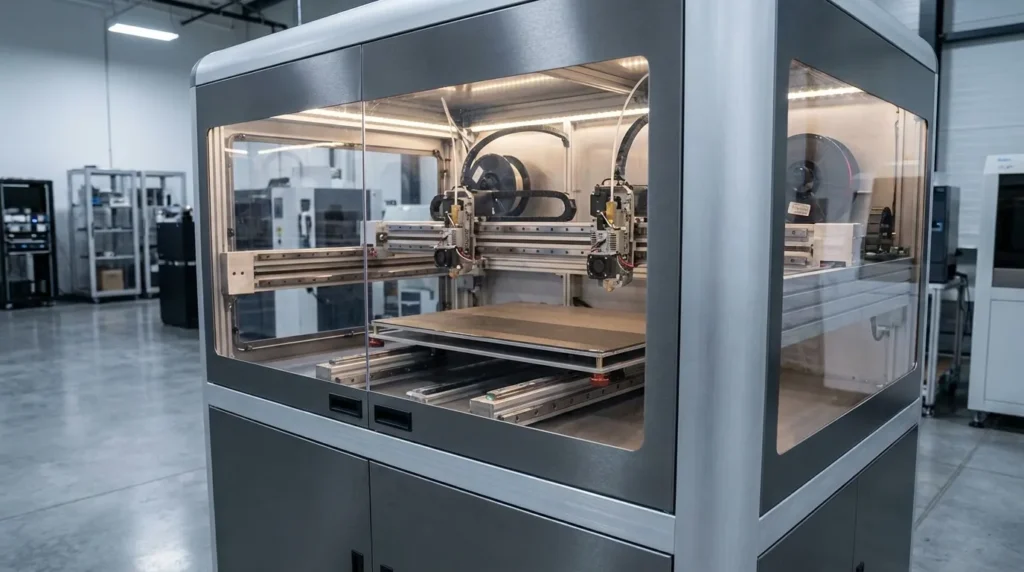
What usually works better are motion upgrades that focus on stability first. Linear rails, for example, can replace wheel-based systems and cut down flex during high acceleration, which is easy to see on longer moves. Add a rigid gantry and reinforced frame, and tight tolerances are more likely to hold during long production runs. This matters even more on larger build volumes. Small vibrations don’t stay minor for long and often turn into real size errors faster than expected.
High-flow hotends are another upgrade that makes a difference. They allow higher extrusion rates without under-melting filament, so layer bonding stays consistent where it counts, between layers that take load. When paired with hardened nozzles, abrasive materials like carbon-fibre nylon are easier to print without constant nozzle changes. That setup works well for tooling and fixtures that need to handle stress and heat over repeated use.
Firmware features like input shaping and pressure advance also help. With proper tuning, modern control systems cut down vibration and ringing at higher speeds. Motion stays controlled, and many teams see print times drop by 20 to 40 percent while surface quality stays within tolerance. Those gains usually come without clear trade-offs.
Thermal Control and Material Handling for Consistent Results
Many industrial print failures start with heat and moisture. It’s usually the simple stuff. Problems like warping and layer separation often come down to thermal conditions, even when the part design is solid and well tested, which can be especially frustrating. In a lot of cases, it’s not the model at all, it’s the environment around it quietly causing issues.
An enclosed, temperature-controlled build chamber is one of the most useful 3D printer upgrades for industrial efficiency, in my experience, and that usually becomes clear pretty quickly. When the chamber stays at a steady temperature, internal stress drops in materials like ABS and nylon. Less stress often leads to stronger parts and fewer failed prints. This matters most on long jobs that run overnight or through the weekend, when no one wants to come back to a surprise failure.
Upgraded heated beds with closed-loop control also help a lot. They keep temperatures more even across the entire build surface, so the first layer sticks more reliably. Automatic bed leveling systems that use load cells cut down setup time and reduce human error. Operators can start jobs sooner and avoid a lot of manual tweaking, which makes day-to-day work feel smoother.
Filament handling is easy to miss, but it often has a bigger impact than expected. Engineering materials absorb moisture quickly, and wet filament can cause bubbles and weak layers. That’s bad for appearance and even worse for strength. Dry storage systems and active filament dryers make a real difference during production runs where consistency needs to hold over weeks or months.
According to industry analysts, material waste can drop by up to 95 percent when processes are well controlled, and that kind of improvement adds up fast.
Automation and IDEX Systems for Scalable Production
When demand starts climbing, manual workflows often slow teams down, and most shops feel it quickly. What begins as a manageable process can turn into a bottleneck. Automation-focused 3D printer upgrades help production scale without adding more labour, which helps when output needs to jump fast. In those moments, speed often matters most.
IDEX dual extrusion systems are a good example because they solve several problems at once. With independent toolheads, you can print multiple materials, use soluble supports, run mirror-mode production, and handle more complex jobs in a single run. For small batch work, this setup can double output using the same machine footprint while keeping part quality consistent between toolheads. That reliability helps day to day.
Tool changers and quick-swap extruders reduce downtime in a very practical way. Instead of long changeovers, printers move between tasks quickly. This works well for workshops making jigs, custom fixtures, spare parts, or the occasional one-off when something breaks.
Remote monitoring and failure detection often improve uptime. Cameras and sensors feed simple dashboards, making it easier to manage multiple machines. In larger print farms, labour needs can drop by 30 percent or more, and that adds up over time.
Greg Paulsen from Protolabs highlights why this matters for production.
Additive manufacturing is increasingly being used for production applications because it can reduce tooling costs by as much as 80, 90% while significantly shortening lead times.
Software, Firmware, and Workflow Integration
Hardware upgrades usually grab the spotlight (they’re flashy, after all), but software often brings bigger efficiency gains, at least from this perspective. When deadlines stack up, modern firmware and workflow tools tend to matter more than raw specs. They cut down on guesswork, give clearer control over timelines and materials, and help teams keep production moving without daily fire drills.
Advanced slicers, for example, can estimate cost per part and total print time, including material use. That level of detail makes quotes more accurate and keeps machine schedules from being reshuffled all the time. Firmware like Klipper changes everyday work too: tuning takes less time, machines can be managed in a browser, and motion features like input shaping help prints run more reliably. These benefits show up most clearly in larger print farms, especially when dozens of machines are running at once.
Integration with MES or ERP systems is appearing more often as well. Job queues, maintenance logs, and usage data are useful for spotting bottlenecks and planning capacity. As Terry Wohlers of Wohlers Associates explains, industrial adoption is driven less by experimentation and more by repeatable processes and control, and these tools directly support that need.
Predictive maintenance is growing, too. By tracking motor loads, temperature trends, and past print data, teams can service machines before failures happen. That usually means fewer surprises and less downtime, which is where hidden costs often start to build up.
Putting It All Into Practice
Improving industrial efficiency usually isn’t about buying everything at once. It often comes down to matching upgrades to real production needs, which sounds simple but rarely is. Where do things hurt most right now? Failed prints, uneven quality, or slow turnaround caused by small problems stacking up. Getting clear on those issues early helps keep spending focused and avoids upgrades that seem smart but don’t fix the real problem later on (I’ve seen that happen plenty of times).
Reliability upgrades often come first. Motion stability is usually the starting point, and steady thermal control with practical filament handling tends to pay off fast because these are problems you notice every day. Those early wins build confidence. Once output feels consistent, it’s easier to look at speed improvements or add small bits of automation. Making changes step by step lowers risk and makes ROI easier to track, especially when results need to be shared.
For Australian manufacturers and educators, local support and proven systems can make a real difference. Industrial‑grade FDM platforms with well‑integrated 3D printer upgrades support production and training‑focused research in a flexible, cost‑effective way. Done right, upgrades lower cost per part and improve uptime, helping printers feel like dependable production tools rather than experimental machines. That’s usually worth another look at the current setup.
