
Table of Contents
3D Printer Parts Guide for Optimal Performance
High‑speed, high‑precision FDM 3D printing has moved well past labs and hobby rooms. Across Australia, engineers, technicians, educators, and manufacturers now depend on FDM printers for real production work, not just prototypes. This includes tooling, fixtures, jigs, and end‑use parts that go straight into service. When prints fail, slip out of tolerance, or suddenly slow a job, the software often gets the blame. In reality, it’s usually not the slicer. More often, problems come from hardware choices and setup, especially when machines are pushed beyond stock settings, which is common in production environments. That part isn’t surprising — and it often comes down to the right 3D printer parts working together.
This guide looks at key 3D printer parts and explains how each one affects day‑to‑day performance. It focuses on industrial and professional‑grade FDM printers, where workloads and expectations are higher. The goal is simple: explain what really matters, what’s often safe to ignore, and where upgrades usually make a difference. It also covers hotends handling steady material flow over long runs, motion systems keeping accuracy for hours, electronics shaping speed and reliability, and cooling and build surfaces influencing layer quality. Current trends are included too, such as high‑speed CoreXY designs, IDEX dual extrusion for parallel jobs, modern firmware integration, and why linear rails are becoming common in production machines.
Why 3D Printer Parts Matter in Industrial FDM Systems
In industrial settings, a 3D printer usually sits right inside the production workflow. It’s not tucked away in a corner. Downtime costs money, often faster than teams expect. When parts aren’t consistent, crews slow down, extra quality checks appear, and momentum fades by the end of a long shift. You’ll often see that key performance numbers come back to basics like the extrusion system, motion hardware, frame stiffness, and control electronics. Small weak spots add up when machines run long jobs or stay active day and night, which is common in industrial setups.
What keeps FDM growing is pretty practical. It hits a useful middle ground between strength and cost, delivering durable parts without stretching budgets too far. Recent industry data shows how widely it’s used.
| Metric | Value | Year |
|---|---|---|
| Global FDM market size | USD 2.7 billion | 2025 |
| Projected market size | USD 7.1 billion | 2030 |
| Industrial share of FDM revenue | 76% | 2024 |
| FDM share of total 3D printing | 35.7% | 2025 |
That usage shows a clear pattern: FDM works best when strength, repeatability, cost control, and predictable output usually matter most. Still, those benefits depend on picking the right parts for the job. A printer built for speed needs different components than one chasing tight tolerances, like using a hardened nozzle for abrasive materials instead of a standard brass one.
Hotends and Extrusion Systems in 3D Printer Parts
How plastic melts and moves during a print mostly comes down to the hotend and extruder. That choice shows up fast in surface quality, layer strength, part accuracy, and how quickly a job can realistically run. In industrial FDM 3D printers, all‑metal hotends are now standard because they handle higher temperatures and stay steady during long production runs, which is usually what factory teams care about. This kind of stability matters more once prints take hours instead of minutes. Most industrial machines run between 240 and 300 degrees C, with temperatures set for each material so results stay consistent instead of feeling like trial and error.
Nozzle choice matters just as much. While a 0.4 mm nozzle is still great for fine detail, many production teams move up to 0.6 mm or larger. Higher flow means shorter print times and fewer late‑night check‑ins, while part strength often stays solid. Heater power, usually 30 to 50 watts, has to keep up with that speed. When it can’t, under‑extrusion shows up quickly, especially at high flow rates.
We designed Lite6 to be a low cost hotend for robust easy printing for everyday filaments, for temperatures up to 240 degrees C and moderate printing speeds.
Extruder design also affects control more than it first seems. Direct drive extruders are common on modern high‑speed machines because retractions are more accurate and material feeding feels tighter. They also work well with flexible and abrasive filaments, like TPU. Bowden systems still appear on older or entry‑level printers, but they often limit material options. For engineers using nylon, carbon fibre blends, or TPU, direct drive is usually the safer choice in real production work.
Motion Systems and Frames: Where Accuracy Is Won or Lost
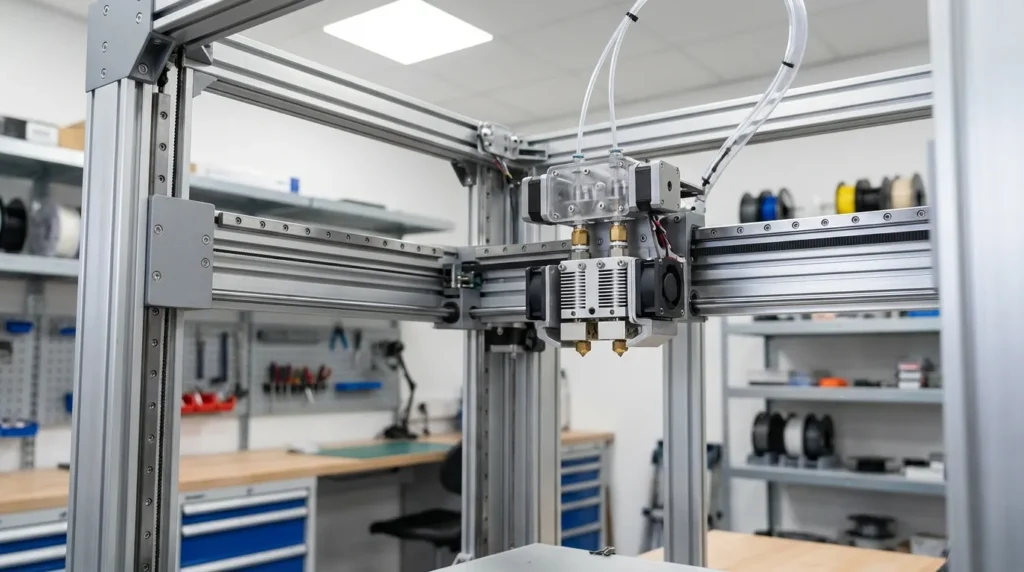
Print accuracy usually comes down to how smoothly and consistently the toolhead moves across the build area. When motion stutters or parts flex, those problems show up on the print surface almost right away. Earlier machines leaned on smooth rods and basic bearings, which worked well enough for slower speeds and occasional jobs, think weekend projects rather than daily production. Industrial FDM 3D printers have mostly moved past that stage. Linear rails, reinforced belts, ball screws, and heavier carriages are now common because they cut vibration and keep motion steady as speeds go up. Once you start pushing throughput, there’s very little room for loose or sloppy movement.
CoreXY motion systems are a big reason high‑performance printers can move quickly without losing control. By keeping heavy motors off the gantry, inertia stays easier to manage, which matters more than many people expect as acceleration increases. When paired with linear rails, CoreXY setups often hit repeatability tighter than ±0.05 mm. In day‑to‑day use, that kind of control means jigs sit flat, fixtures line up on the first try, and mating parts slide together without sanding or forcing them.
Frame rigidity quietly holds everything together. Aluminium extrusion frames are fine for lighter duty and hobby use, but production settings often benefit from steel or reinforced aluminium. These frames hold their shape better over time. Flex usually shows up as ringing or layer shifts, easy to miss early on, but hard to ignore at higher speeds.
Many calibration problems blamed on software actually start with the mechanics: motors, belts, and frames, the less exciting parts. Regular tuning helps, but hardware limits still exist. This topic is explained in more detail in the Ultimate Guide to FDM 3D Printer Calibration Techniques and also in the Essential Guide to FDM 3D Printer Setup and Optimization.
Electronics, Power, and Firmware: Enabling Speed and Stability
Modern electronics unlock the real benefits of advanced 3D printer parts, and this becomes clear after time with newer machines, especially when comparing them side by side. Today’s control boards handle higher step rates, quieter drivers, real‑time motion correction, and extra room for features that may be added later. These improvements show up quickly in daily use. Power systems have also improved, often quietly in the background. Most industrial FDM printers now use 24‑volt setups, which usually lower current draw, improve electrical safety, speed up heater warm‑up, and reduce strain on wiring over long cable runs. Over months of use, this often matters more than expected, and maintenance teams usually notice.
The industry is moving toward 24 volt, it is safer overall because you have less amperage to get the same wattage.
Firmware matters too. Klipper‑based systems move motion calculations to an external processor, which is a practical and clean design. This setup allows input shaping and pressure advance, helping control vibration and keep extrusion steady at higher speeds. With good motion hardware, printers can exceed 300 mm per second and still stay accurate, something teams see in daily production, not just test prints.
For teams chasing speed, firmware tuning often matters almost as much as hardware. In many cases, real gains come with little cost, which is why the effort is usually worth it.
Advanced Configurations: IDEX, Enclosures, and Thermal Control
As applications grow, system demands usually climb right along with them, it’s hard to avoid. One of the more interesting upgrades here is IDEX dual extrusion. With two independent toolheads, the idea is simple, but the payoff can be big. It makes multi‑material printing smoother, opens the door to soluble supports, allows parallel part production, and even supports mirror printing on certain machines. For short‑run manufacturing, that can nearly double output on the same bench or cart, which is often the real limit. Space matters, especially in small shops where every square meter needs to pull its weight.
Thermal control matters just as much. Enclosed build chambers keep temperatures steadier around the part for ABS, nylon, PETG, and composites. That steady heat usually means less warping, stronger layer bonding, and fewer overnight failures. From my experience, many production problems come from poor thermal control, even though the material often gets blamed.
OEMs are shifting low‑volume service components and legacy spares to additive to avoid tooling costs. Automotive sheet‑metal plants now print custom cutting guides that meet tolerance windows while cutting tool costs by 90%.
For high‑speed setups, enclosure design also needs to handle airflow paths, electronics cooling areas, safety panels, and easy access for maintenance, no one wants to tear down half a printer. A well‑built enclosure can prevent heat creep, random board failures, surface defects, and those painful hour‑eight crashes. That’s why these details are explained in practical terms in our guide on 3D printer enclosure setup for high‑speed FDM printing and also in IDEX System Installation & Calibration for V‑Core 3D Printers.
Keeping Performance High Over Time
Downtime usually costs more than parts, especially when a worn nozzle or loose belt wrecks a long print halfway through. Even the best 3D printer parts wear out (yeah, even the good ones). Over time, nozzles wear down, belts stretch, bearings pick up dust, and fans start getting loud. In industrial settings, maintenance isn’t optional, it’s how teams stop print quality from slowly slipping. A simple inspection routine, like quick visual checks and basic tension tests, often catches issues early, usually with a short weekly check.
Tracking print hours makes it easier to know when to swap parts and can save real downtime. Hardened nozzles last longer with abrasive filaments, and quality belts keep their tension after months of heat. Clean rails cut friction and noise, which helps control costs and keeps layers even. For teams running printers every day, regular upkeep really does make the difference. A good example is the routines shared in maintaining industrial 3D printers for continuous operation and in the FDM 3D printer maintenance: Essential Practices for Reliability, built around real production schedules.
Putting It All Into Practice
Understanding 3D printer parts usually isn’t about memorising spec sheets. It’s more about matching the hardware to the work you actually run every day, including the boring repeat jobs that quietly take up most production time. Hotends decide which materials you can realistically use. Motion systems affect how fast parts print and how accurate they are, and there’s often a trade‑off between speed and precision. Electronics, firmware, and sensors only really matter when they’re set up and tuned to work well together. Enclosures and temperature control then help keep prints steady and predictable during long, overnight runs.
For Australian engineers and manufacturers, industrial FDM 3D printers make local production practical without waiting weeks for tooling. In my view, the real benefit comes from choosing or building machines with the right parts from the start, even if that means a bit more planning early on. Stability usually matters most at the beginning, especially frames and motion systems. Hardware upgrades often do more than endless profile tweaks. When maintenance is treated as normal production work, printers tend to become reliable tools people use every day.
